
Download Asterisk Password – password recovery, recover password, reveal password, hidden password, asterisk password
Overview
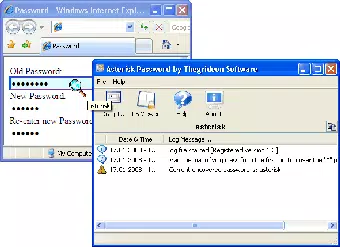
Asterisk Password is a specialized utility designed for Windows users seeking to recover passwords obscured by asterisks in input fields. The application targets a niche but critical need: retrieving forgotten or lost credentials from various software environments, including Internet Explorer and ActiveX controls. Its core purpose is to assist users who are locked out of accounts or applications due to memory lapses, offering a direct method to unveil hidden passwords without requiring complex technical workarounds.
Target users include system administrators, IT professionals, and general users managing multiple accounts on Windows-based systems. The app is particularly useful in scenarios where password managers are unavailable or when legacy systems lack modern recovery options. By accessing data stored in Windows Protected Storage and LSA Secrets, Asterisk Password extends its utility beyond simple form fields, providing deeper system-level access to critical security information.
Developed by Passcape Software, the tool has been available since 2011, indicating a long-standing presence in the productivity and security space. Although the developer did not provide additional technical details, the app’s continued relevance suggests a stable and functional design. In the broader software ecosystem, it fills a gap left by mainstream tools that do not support password retrieval from obscured fields or internal Windows storage mechanisms.
Real-world use cases include recovering login credentials for archived applications, accessing legacy systems, or restoring access to web accounts stored in Internet Explorer. The tool’s lightweight nature and compatibility with both 32-bit and 64-bit systems make it a practical choice for environments where resource efficiency is essential.
Key Features & Functionality
- Password Retrieval: Enables users to reveal passwords hidden behind asterisks in input fields across various applications. This functionality is especially useful when re-entering credentials is not feasible due to memory loss.
- Browser Support: Specifically designed to recover passwords stored in Internet Explorer web pages, providing a streamlined method to access saved credentials without manual re-entry.
- LSA Secrets Access: Offers the ability to display the contents of the Local Security Authority (LSA) Secrets, which store sensitive system-level authentication data used by Windows services and applications.
- Windows Compatibility: Fully supports both 32-bit and 64-bit Windows applications, ensuring broad usability across different system architectures and software environments.
- User-Friendly Interface: Features a straightforward and intuitive design that allows users of all experience levels to initiate password recovery with minimal effort, reducing the learning curve.
For example, a system administrator managing multiple legacy applications can use the tool to quickly recover a forgotten password from an obscured field without restarting the application or contacting support. Similarly, a user who has not accessed a specific website in months can retrieve their saved login details directly from Internet Explorer using this utility. The ability to access LSA Secrets also supports advanced troubleshooting scenarios, such as diagnosing authentication failures in enterprise environments.
Each feature is tailored to address real-world challenges in password management, particularly in older or less flexible systems. The combination of accessibility, compatibility, and targeted functionality makes Asterisk Password a valuable tool for users who need immediate access to stored credentials.
Interface, UX & Performance
The interface of Asterisk Password is described as straightforward and intuitive, allowing users to navigate the application with minimal technical knowledge. The layout appears optimized for task-focused workflows, with essential functions accessible through clear labels and minimal visual clutter. This design philosophy supports quick initiation of password recovery processes, aligning with the tool’s purpose as a utility for urgent access needs.
Navigation is likely linear, with a focus on initiating the recovery scan and viewing results. While specific interaction details are not disclosed, the emphasis on usability suggests that the app avoids complex menus or multi-step configurations. This simplicity enhances user confidence, especially for non-technical users who may be unfamiliar with system-level tools.
Although the developer did not list formal performance metrics, the app’s file size of 3.5 MB indicates a lightweight footprint, suggesting efficient resource usage. It is expected to operate smoothly on modern Windows systems without causing significant system lag or memory strain. Responsiveness is likely consistent, given the nature of the tasks involved—scanning input fields and retrieving stored data—though actual performance may vary based on system configuration and the number of target applications.
Stability is implied by the app’s long-standing release history, with no indication of frequent crashes or errors. However, compatibility with current Windows versions is not explicitly confirmed, so users should verify system requirements before installation. Overall, the user experience appears tailored to deliver reliable results with minimal friction.
Platform Compatibility & Technical Requirements
Asterisk Password is designed for the Windows platform and supports both 32-bit and 64-bit application environments. The software has a file size of 3.5 MB, making it a compact utility suitable for systems with limited storage. The version available is 1.0.0, released on October 3, 2011.
The developer did not specify minimum OS requirements or compatibility with specific Windows versions beyond architecture support. As such, users should exercise caution when installing on newer Windows systems, as compatibility may depend on system updates, security policies, or changes in Windows API access. The app may require elevated permissions to access protected system data, such as LSA Secrets, which could trigger security warnings during installation or execution.
While the tool is compatible with both application architectures, no information was provided regarding required .NET Framework versions, system libraries, or hardware specifications. Users should ensure their systems meet standard Windows requirements for running legacy applications. The absence of detailed technical disclosures limits the ability to assess full compatibility, but the lightweight nature of the app increases the likelihood of successful operation on a wide range of devices.
Pros and Cons
Pros
- Efficient password recovery from obscured input fields
- Supports Internet Explorer and ActiveX controls
- Accesses Windows Protected Storage and LSA Secrets
- Compatible with both 32-bit and 64-bit systems
- Lightweight file size (3.5 MB)
- Simple and intuitive user interface
Cons
- Released in 2011; may lack support for newer Windows security features
- Compatibility with current Windows versions not confirmed
- Developer did not list specific system requirements
- Only available for Windows, limiting cross-platform use
- Price of $19.95 may be considered high for a legacy tool
FAQ
Is Asterisk Password safe to use?
Yes, when used responsibly and on systems where you have authorized access. The tool accesses protected system data, so it should only be used on devices you own or have permission to manage.
Can I use Asterisk Password on Windows 10 or 11?
While the app was released in 2011 and supports 32-bit and 64-bit systems, compatibility with Windows 10 or 11 is not officially confirmed. Users should test the tool in a safe environment before relying on it.
Does Asterisk Password require admin rights?
Due to its ability to access protected system storage and LSA Secrets, the application likely requires elevated privileges to function properly. Running it as an administrator is recommended.
Is Asterisk Password available for Android or iOS?
No. The tool is exclusively designed for Windows and is not available on mobile platforms.
How often is Asterisk Password updated?
The current version is 1.0.0, released in 2011. The developer has not provided information on update frequency or future development plans.
Final Thoughts
Asterisk Password remains a functional utility for users needing to recover passwords hidden behind asterisks in Windows applications. Its ability to access Internet Explorer credentials, Protected Storage, and LSA Secrets makes it a valuable tool in specific technical scenarios, especially for legacy system maintenance. While its age raises concerns about modern compatibility, its lightweight design and straightforward interface continue to offer practical benefits.
It is best suited for IT professionals, system administrators, and users managing older software environments where password recovery is critical. The $19.95 price point may be justified for those who rely on its unique capabilities, though users should carefully assess compatibility with current systems.
For anyone seeking a reliable method to reveal hidden passwords on Windows, Asterisk Password delivers a focused solution. Download Asterisk Password now.


